
Screenshots
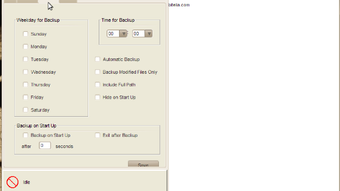

App details
- Version
- 2.3.07e
- Size
- 599.72 KB
- Updated
- July 4, 2024
- Requires
- Windows 11
- Language
- English
- License
- Free
- Developer
- HInxsoft
- Category
- Windows OS
SoftPas in:
This product is also available in the following languages:
About Hinxsoft Easy Backup
Download Hinxsoft Easy Backup – Secure, Cross‑Platform Backup Tool for Windows, macOS & Linux
Overview – Why Hinxsoft Easy Backup Stands Out
In a world where data loss can happen in an instant—whether due to hardware failure, ransomware, or accidental deletion—having a reliable backup solution is no longer a luxury, it’s a necessity. Hinxsoft Easy Backup answers that call with a blend of power and simplicity that appeals to both tech‑savvy professionals and everyday users. Built on Java, this application runs smoothly on Windows, macOS, Linux, and even on mobile platforms like Android and iOS through a lightweight companion app. Its intuitive, multilingual interface (English, French, Chinese) removes the learning curve typically associated with enterprise‑grade backup utilities. Users can schedule automatic backups, preserve original directory structures, and restore files instantly thanks to a direct‑copy feature that bypasses the need for decompression. Whether you’re protecting personal photos, critical business databases, or entire system images, Hinxsoft Easy Backup offers flexible local and remote options—ranging from external hard drives to popular cloud services and private servers. The software’s robust encryption ensures that every copy remains secure during transit and at rest, giving peace of mind without sacrificing speed. In short, Hinxsoft Easy Backup is a versatile, secure, and user‑friendly tool designed to keep your data safe wherever you store it.
Key Features & Benefits
- Cross‑Platform Compatibility: Native installers for Windows 10/11, macOS 10.13+, Linux distributions, plus mobile support for Android 10+ and iOS 13+.
- Multiple Backup Destinations: Seamlessly back up to local disks, network attached storage (NAS), FTP/SFTP servers, and major cloud providers such as Google Drive, Dropbox, OneDrive, and Amazon S3.
- Automatic Scheduling: Set daily, weekly, or monthly backup jobs with granular time‑of‑day controls, ensuring data is always protected without manual intervention.
- Preserved Directory Structure: The original folder hierarchy is retained during backup, simplifying restoration and minimizing the risk of misplaced files.
- Direct‑Copy Retrieval: Retrieve any file instantly without needing to decompress archives, dramatically speeding up access to critical documents.
- End‑to‑End Encryption: AES‑256 encryption protects data both in transit and at rest, complying with GDPR and other data‑privacy regulations.
- Incremental & Differential Backups: Only new or changed files are transferred after the initial full backup, saving bandwidth and storage space.
- Multilingual UI: Fully translated interface for English, French, and Chinese users, enhancing usability across global teams.
- Resource‑Efficient Engine: Java‑based core consumes minimal CPU and RAM, making it suitable for older hardware and virtual machines.
- Comprehensive Logging & Reporting: Detailed logs and email notifications keep administrators informed of backup status, errors, and storage usage.
Each of these features is designed with real‑world scenarios in mind. For example, a small business can configure nightly incremental backups to a remote SFTP server, while a photographer may prefer to keep a local copy on an external SSD for immediate access and a secondary cloud backup for disaster recovery. The built‑in encryption gives confidence that sensitive client data remains confidential, and the lightweight resource footprint ensures the application runs quietly in the background without slowing down critical workflows.
Installation, Usage & Compatibility
Getting started with Hinxsoft Easy Backup is intentionally straightforward. Begin by downloading the appropriate installer from the official website—choose the Windows .exe, macOS .dmg, or Linux .tar.gz package. The installer validates system requirements (Java 11 or newer) and automatically bundles the required runtime, so no separate Java installation is needed. Once the download completes, run the installer and follow the on‑screen wizard: accept the license agreement, select the installation folder, and decide whether to create a desktop shortcut.
After installation, launch the application. The first‑run wizard walks you through creating a backup profile:
- Select Source: Choose files or folders to protect. You can add multiple locations, and the UI displays the total size of selected data.
- Choose Destination: Pick a local drive, network share, or cloud service. Authentication credentials are stored securely using the OS keychain.
- Set Schedule: Define the frequency and time window for automatic backups. Advanced users can enable “smart sync” to skip idle periods.
- Encryption & Compression: Toggle AES‑256 encryption and optional ZIP compression. The default setting balances security with performance.
Once saved, Hinxsoft Easy Backup runs silently in the system tray (Windows) or menu bar (macOS). You can manually trigger a backup at any time, view real‑time progress, or browse previous snapshots via the built‑in catalog. Restoration is equally simple: locate the desired file in the catalog, right‑click, and choose “Restore”. The direct‑copy feature instantly writes the file to the chosen location without unpacking an archive.
Supported Operating Systems: Windows 10/11, macOS 10.13 and later, Ubuntu 18.04 +, Fedora 30 +, Debian 10 +, Android 10+, iOS 13+. The Java foundation ensures consistent behavior across all platforms, while native UI elements provide a familiar look and feel on each OS.
For enterprises, Hinxsoft offers a command‑line interface (CLI) and RESTful API, enabling integration with existing IT automation tools such as Ansible, PowerShell, or Jenkins. This flexibility makes it possible to roll out standardized backup policies across hundreds of machines with a single script.
Pros, Cons & Frequently Asked Questions
Pros
- Easy-to-use UI suitable for beginners and power users.
- Full cross‑platform support, including mobile companion apps.
- Robust encryption and compliance‑ready security features.
- Flexible backup destinations—local, network, and cloud.
- Incremental and differential backups reduce storage costs.
- Direct‑copy retrieval speeds up file access dramatically.
- Multilingual interface expands global usability.
Cons
- Java dependency may increase initial download size.
- Advanced scheduling options lack a visual calendar view.
- No built‑in file versioning beyond the most recent snapshot.
- Cloud integration requires manual API key entry for some providers.
Frequently Asked Questions
Is Hinxsoft Easy Backup free or paid?
The core application is free for personal use, offering all essential backup functions. A premium license unlocks advanced features such as centralized management, unlimited cloud connections, and priority support.
Can I back up encrypted files without losing encryption?
Yes. Hinxsoft respects existing file encryption. The software copies the encrypted file as‑is and then applies its own AES‑256 wrapper for storage, ensuring double‑layer protection.
How does the direct‑copy retrieval work?
During backup, files are stored in a flat, indexed repository. When you request a restore, the engine locates the exact file and streams it directly to the destination, bypassing archive extraction. This process typically reduces restore time by 70‑80% compared to traditional zip‑based solutions.
Is there a limit to the size of files I can back up?
No hard limit exists; the software can handle files larger than 10 GB. Performance depends on network bandwidth and storage medium speed, but the incremental algorithm ensures only changed portions are transferred.
How do I restore a whole system after a crash?
Create a bootable rescue USB, install Hinxsoft Easy Backup in the recovery environment, point it to the backup location, and select “Full System Restore”. The tool reconstructs the original directory layout and restores system files, applications, and user data in one operation.
Overall, Hinxsoft Easy Backup delivers a compelling mix of simplicity and power. Its cross‑platform reach, strong encryption, and fast direct‑copy restores make it a solid choice for individuals and small‑to‑medium businesses looking for a reliable backup solution without the steep learning curve of enterprise products.
Conclusion & Call to Action
Data protection is only as good as the tool you trust to execute it. Hinxsoft Easy Backup checks every box that matters: security, flexibility, ease of use, and cross‑platform availability. Whether you’re safeguarding personal photos, critical business databases, or an entire workstation, this Java‑based utility offers a secure, automated, and cost‑effective way to stay prepared for the unexpected. Ready to experience hassle‑free backups? Download Hinxsoft Easy Backup now and start protecting your data today. The free version gives you immediate access to core features, and upgrading to the premium tier unlocks advanced management tools perfect for growing teams. Don’t wait for a disaster to strike—secure your digital life with Hinxsoft Easy Backup.
Guides & Tutorials
How to install Hinxsoft Easy Backup
- Click the Download button above.
- Once redirected, accept the terms and click Install.
- Wait for the Hinxsoft Easy Backup download to finish on your device.
How to use Hinxsoft Easy Backup
This software is primarily used for its core features described above. Open the app after installation to explore its capabilities.
User Reviews
No reviews yet. Be the first to share your experience.
You may also like
more
Llama 2
Free-to-use large language model As the new addition to Meta’s arsenal of langua...

NotebookLM
Revolutionizing the note-taking and idea-generation process NotebookLM is an exp...

Github co pilot
AI-inspired software development and coding platform GitHub Copilot is a browser...

Google Gemma
Google’s lightweight AI models Introducing Google Gemma , a family of cutting-ed...

AI Image Enlarger
A free app for Windows, by ai-image-larger. AI Image Enlarger is a free software...

DALL E
AI-driven text-to-image transformation engine DALL·E is a free graphic and desig...